ImaraISP
How ImaraISP fits together
The pieces of ImaraISP and how a payment turns into a subscriber being online
ImaraISP is the billing and network control room for a small or mid-size ISP. This page names the pieces you will meet in the admin app and shows how they connect. Read it once; the rest of the guide assumes these words.
Your workspace (the tenant)
Your ISP is a workspace, also called a tenant. It lives at its own path under the one app address, app.imaraisp.ke/t/yourisp, where yourisp is the short name derived from your ISP name at sign-up (for example app.imaraisp.ke/t/coastlink). Everything you see in the app belongs to that workspace: customers, plans, routers, payments and staff.
Workspaces form a tree. A reseller can have several ISPs under it, and an ISP can have branches. Staff from a reseller can "switch" into an ISP beneath them to help. When that happens a banner is shown at the top of every screen and every action they take is logged in that ISP. See Team & roles for how upstream access is listed.
Staff and roles
Each person on your team has one role in the workspace. The role decides what they can see and do; the app hides any control the role does not allow.
| Role | What they can do |
|---|---|
| Owner | Everything, including money settings, roles and this workspace's settings. Use sparingly. |
| Ops | Everything day-to-day across customers, payments and routers. Not billing settings or team. |
| Cashier | Collect and match payments, record cash, see customers. Cannot change plans or refund. |
| Support | See customers and sessions, reconnect them. |
| FieldTech | Add and fix routers, reconnect customers, see sessions. No money. |
| Viewer | Read-only access to customers, payments and reports. |
Routers over WireGuard
Your MikroTik routers (RouterOS v7 only) join the platform over a private WireGuard tunnel. You add a router in the app, paste one generated script into Winbox, and the router comes up on the tunnel within about a minute. The platform never reaches out to configure a new router by itself; the script you paste does the joining.
Once a router is on the tunnel the platform can see its WireGuard handshake, probe RADIUS from it and log in to its management API. A router with no handshake for more than 3 minutes is marked OFFLINE and shows up on Home.
Plans
A plan is what you sell: a name, a speed, a price, a validity (hours or days), a grace period and a type (PPPoE, HOTSPOT, DHCP or STATIC). Every plan becomes a RADIUS group on the platform. Routers are configured once; plans are created and edited in the app. See Plans.
Customers and services
A customer is a person with a name and a phone number. A service is that customer's connection on a plan: a PPPoE username and password, or a hotspot login. A customer can have more than one service. The service carries the expiry date; when it passes, the grace period starts, and after that the subscriber is cut off until they pay.
The phone number is the universal search key. Every search box in the app accepts a phone number, a name or a username, and a partial number matches.
The RADIUS realm
Every workspace has its own RADIUS realm. Subscribers authenticate against the platform's RADIUS server through your routers. Usernames are unique inside your workspace; the router adds the realm on its own. When a service is created, extended or expires, the platform rewrites the subscriber's RADIUS entries and, where needed, sends a CoA (Change of Authorization) to the router so the change takes effect without waiting for the subscriber to reconnect.
How money flows
Subscribers pay in your workspace's currency through the payment providers you switch on, in one of three ways:
- Phone prompt from the Pay now screen or the captive portal: the subscriber gets a payment prompt from your provider on their phone.
- Paid in directly: the subscriber pays your business number themselves and your provider notifies the platform.
- Cash or bank: a cashier records it and clicks Mark paid.
For example, in Kenya the phone prompt is an M-Pesa STK push and paying in directly means paying your M-Pesa Paybill (C2B).
Whichever way the money arrives, the same thing happens next:
- The payment is recorded once, even if your provider sends the notification twice.
- The platform matches it to a service by the provider's reference or the account number.
- On a match the payment becomes PAID, the service is extended, and a CoA reconnects the subscriber in seconds.
- Money that cannot be matched (wrong reference, unknown number) becomes UNMATCHED and waits in the Payments queue for a person to match it. Nothing is discarded, and no service is granted until a person decides.
A payment moves through these states: INITIATING, PENDING, then PAID, FAILED, UNMATCHED, EXPIRED or REVERSED. A FAILED payment never quietly becomes PAID. See Payment states.
How the platform bills you
Your workspace is billed by ImaraISP (or by your reseller) in billable units: active subscribers, routers, hotspot logins, payment transactions, SMS and so on. Your plan includes a quantity of each; use above that accrues overage and shows in a banner. Nothing is cut off for going over. Even if your SaaS subscription is suspended, RADIUS, the captive portal and cashier Mark paid keep working. Your customers are never cut off because of your bill. See Your subscription.
A day in the life
For example, a day at an ISP in Kenya that takes M-Pesa and cash:
| Time | Who | What happens | Where you see it |
|---|---|---|---|
| 06:00 | A subscriber | Plan expired overnight; grace period starts, speed drops | Home, "in grace period" row |
| 08:12 | The subscriber | Pays KES 1,500 to your Paybill from their phone | Payments, then Home "Recent payments" |
| 08:12 | The platform | Matches the payment, extends the service 30 days, sends CoA | Customer detail, status Online |
| 09:30 | A cashier | Takes KES 500 cash for a hotspot bundle, clicks Mark paid | Payments (Cash · cashier name) |
| 11:00 | A field tech | Adds a new MikroTik, pastes the script, checks go green | Network, router detail |
| 14:20 | M-Pesa | KES 1,000 arrives with a reference nobody recognises | Home "couldn't be matched", Payments Unmatched queue |
| 14:25 | A cashier | Matches it to the right customer | Customer is extended and reconnected |
| 16:40 | A router | Loses power; no handshake for 3 minutes | Home routers card turns red, "Open router" |
What the Home screen shows
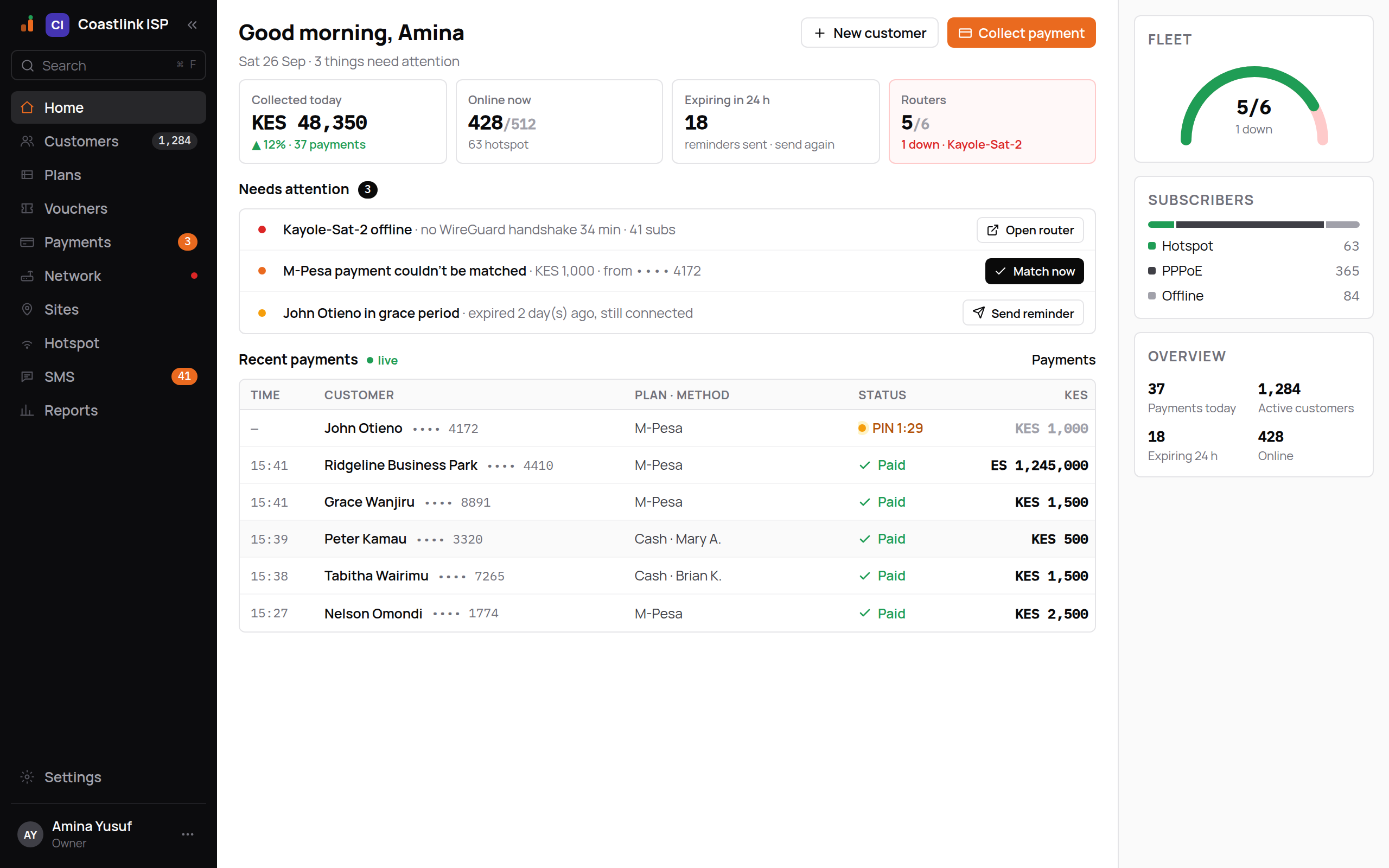
Home is built around "what needs me right now": today's collections, who is online, what expires in 24 hours, router health and a short attention list. In the example below the demo workspace Coastlink ISP has one router down, one unmatched payment and one customer in grace.