 ImaraISP
Plans
Create what you sell, what each field means, what a plan becomes in RADIUS, and what happens when you edit a plan customers are on
A plan is what a subscriber buys: a speed, a price and how long it lasts. Every plan is a RADIUS group on the platform. The router is configured once when you add it; plans are created and changed here and nothing is pushed to routers.
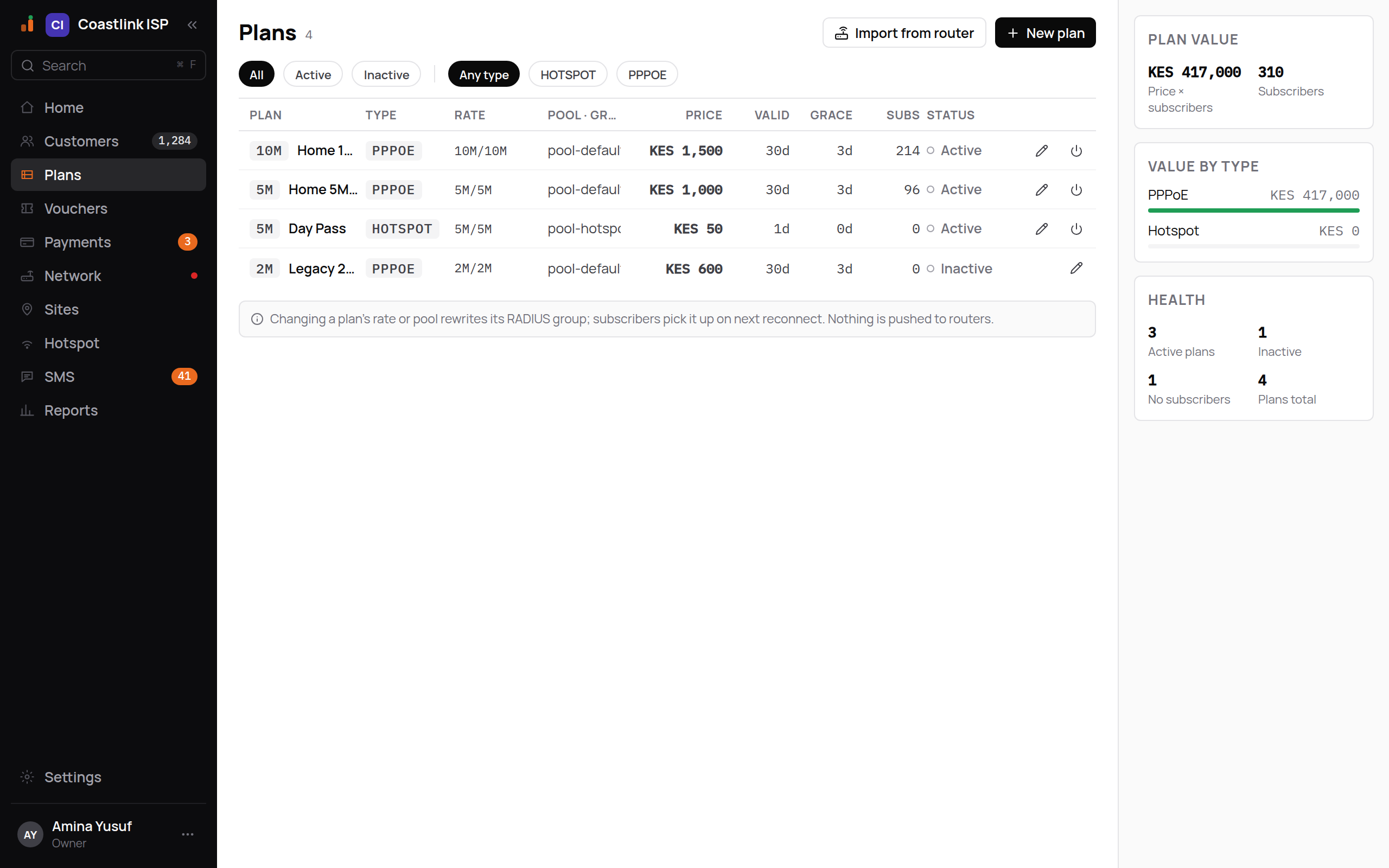
The list
The header shows Plans with the count, an Import from router button and the primary New plan. Chips filter by status (all, active, inactive) and, once you have more than one type, by type ("Any type", PPPOE, HOTSPOT, and so on).
| Column | Meaning |
|---|---|
| Plan | A short tag from the download speed ("20M") and the plan name |
| Type | PPPOE, HOTSPOT, DHCP or STATIC |
| Rate | The MikroTik rate limit, for example 10M/10M |
| Pool · group | The IP pool subscribers draw from, with the RADIUS group name beneath |
| Price | In KES |
| Valid | Validity, "30d" or "24h" |
| Grace | Days after expiry before the subscriber is suspended |
| Subs | How many services are on this plan |
| Status | Active or Inactive |
Empty state: "No plans yet. Create your first plan to start selling access."
The right rail shows Plan value (price times subscribers, and total subscribers), Value by type and Health (active, inactive, plans with no subscribers, total).
Create a plan
Owners and Ops can create and edit plans.
Click New plan
The "New plan" dialog opens.
Fill in the fields
| Field | Meaning |
|---|---|
| Name | "What your customers will see on the portal, e.g. "Home 10Mbps"." |
| Type | PPPOE for home fibre or wireless CPE logins; HOTSPOT for captive-portal Wi-Fi; DHCP and STATIC for lease-based or fixed-IP services |
| Speed | "Download/upload, the way MikroTik writes it. "10M/10M" is 10 Mbps each way." Chips under the field offer the speeds you already sell, then a common ladder from 1M/1M to 50M/50M |
| IP pool | "The range subscribers get an address from — it must exist on the router." Defaults to pool-default; reuse one you already have unless this plan needs its own |
| Billing | PREPAID (pay first, then online) or POSTPAID |
| Price (KES) | Whole shillings, for example 1500 for KES 1,500 |
| Validity | A number plus Hours or Days. "Hotspot bundles are usually 1, 3, 6 or 24 hours." "A home plan is usually 30 days." |
| Grace (days) | Days after expiry the subscriber stays connected before suspension. Default 3 |
| RADIUS group | "The internal name RADIUS uses for this plan. Filled in from the name — change it only if you have a reason to." "Home 10Mbps" becomes home-10mbps |
| Customers can switch to this plan themselves | A checkbox, off by default. "Shown under Change plan in their account area. The switch is prorated from their credit, like a change you make here." See Self-serve plans |
Click Create plan
The plan appears as Active. If the dialog says "Couldn't save the plan — check the fields and try again.", look for an empty speed or a group name already in use.
Speed and validity are what a plan limits: the rate the subscriber gets and how long it lasts.
Self-serve plans
A plan is staff-only until you tick Customers can switch to this plan themselves on its form. Only ticked plans are offered to subscribers under Change plan in their account area, and only to connections of the same type (a PPPoE subscriber never sees hotspot plans). An unticked plan is never offered there, but staff can still move a customer onto it from the customer record.
A subscriber's switch follows the same rules as one you make: unused days are credited, the switch happens now when their credit covers the new plan, and otherwise it waits for payment. See Changing plan.
Tick it on the plans you are happy for people to pick themselves, typically your regular home plans, and leave it off for special or business plans you only sell by hand.
Import from router
If your router already has PPP or hotspot profiles, click Import from router, choose a Router, and the dialog lists each profile with its rate limit and pool. Use as new plan opens the New plan form with the name, type, speed, pool and group filled in. Add a price and validity and save. This only reads from the router; it changes nothing on it.
What a plan becomes in RADIUS
Each plan is a RADIUS group named by its RADIUS group field. The group carries the speed as the MikroTik rate limit and the pool as the address pool. When a subscriber's service is created or extended, their RADIUS entry is placed in the plan's group. When the service expires and grace runs out, the entry moves to the plan's expired group, which is what cuts them off. A CoA tells the router to apply the change to a live session.
Editing a plan customers are on
Click the pencil on a row to open "Edit Home 10Mbps". The same fields apply, then Save changes. The strip under the table states the rule:
Changing a plan's rate or pool rewrites its RADIUS group; subscribers pick it up on next reconnect. Nothing is pushed to routers.
So a speed change reaches existing subscribers when they next reconnect, not instantly. A price change affects only future purchases and renewals.
Deactivating a plan
The power icon on an active row deactivates it, so it no longer appears on the portal or in the New customer dialog. A plan with services still on it refuses with "3 subscribers still on this plan." Move those services to another plan first. Deactivation does not delete history.