 ImaraISP
The Home screen
What every card, alert and row on Home means, the New customer action and the keyboard shortcuts
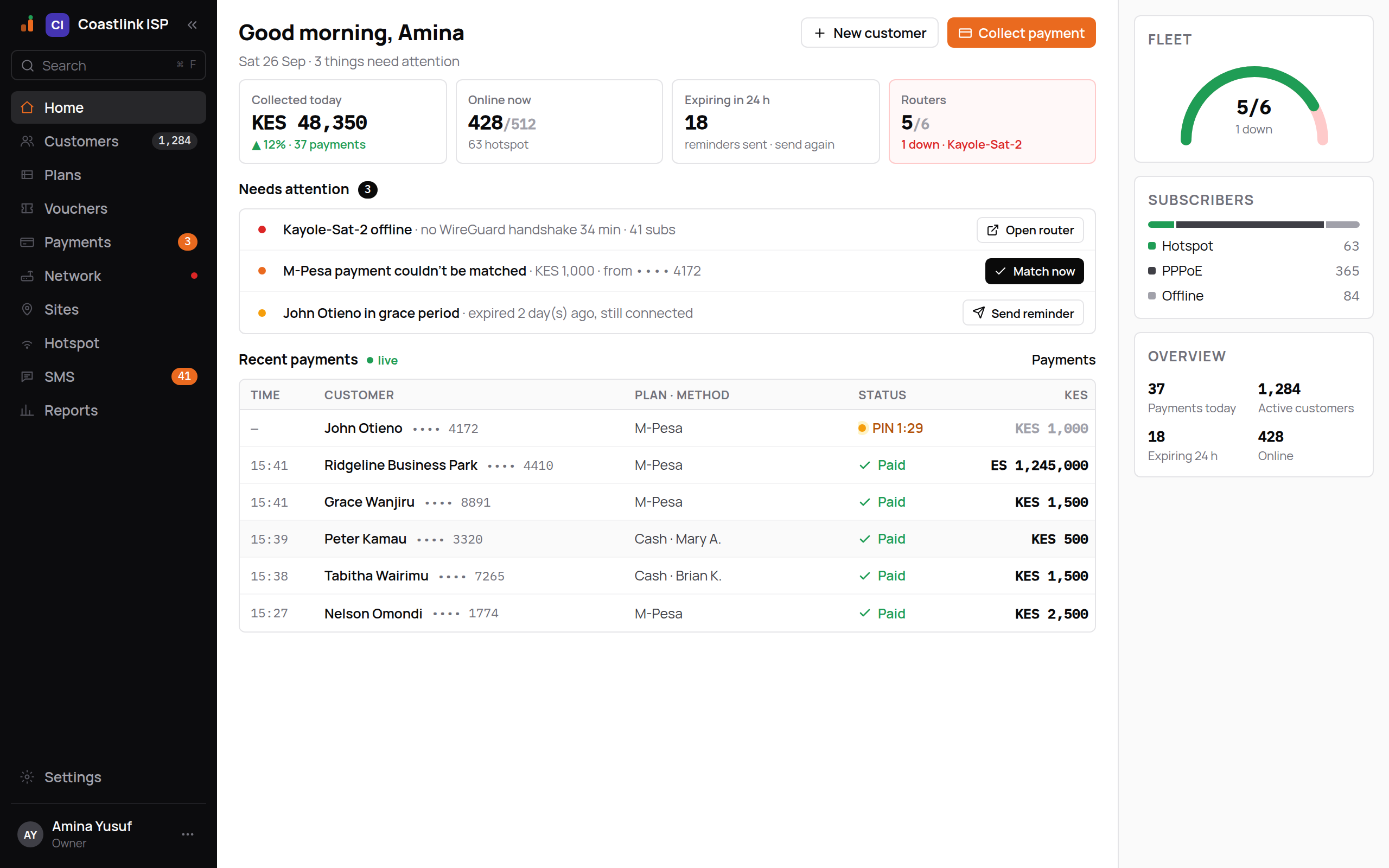
Home answers one question: what needs me right now. It greets you by first name ("Good morning, Amina"), shows the date and how many things need attention, and lays out four figures, an attention list and the live payment feed. In the example below the demo workspace Coastlink ISP has three things waiting.
The sidebar
The left rail is the same on every screen: Home, Customers (with the active count), Plans, Vouchers, Payments (with the number of unmatched payments), Network (a dot appears when any router is down), Sites, Hotspot, SMS (failed message count), Reports and Settings. Items your role cannot use are not shown.
The two actions in the header
- New customer opens the new-customer dialog (see below). It is the one thing an operator does most on a quiet day.
- Collect payment is the orange money action. Home has no customer in hand, so it opens the search box; find the subscriber and press
Pto go straight to Pay now.
You only see the buttons your role allows.
The four cards
| Card | What it shows | Notes |
|---|---|---|
| Collected today | Money settled today in your currency, for example KES 48,350, with the change against yesterday and the payment count ("▲ 12% · 37 payments") | Green means money in |
| Online now | Sessions online over active services, "428/512", and how many are hotspot | From live RADIUS accounting |
| Expiring in 24 h | Services that reach their expiry within a day | The sub-line reads "reminders sent · send again" |
| Routers | Routers up over routers total, "5/6" | Turns red with "1 down · Kayole-Sat-2" when any router is offline; otherwise "all up" |
The Routers card is the only one that can go red, because a router down is a fault, not a measurement.
Needs attention
Each row is one thing to act on: a coloured dot, one line of text and a button.
| Row | Example | Button and where it goes |
|---|---|---|
| Router offline (red) | "Kayole-Sat-2 offline · no WireGuard handshake 34 min · 41 subs" | Open router: the router's detail page |
| Unmatched payment (orange) | For example "Payment couldn't be matched · KES 1,000 · from •••• 4172" | Match now: the Payments screen, which opens on its Unmatched queue |
| Customer in grace (amber) | "John Otieno in grace period · expired 2 day(s) ago, still connected" | Send reminder (shown for staff who can see customers) |
When there is nothing to do the block reads "Nothing needs attention. You're all caught up — check back later."
What an unmatched payment means
Money arrived through one of your payment providers but the platform could not tell which service it belongs to. It is not lost and it is not applied. A cashier matches it from Payments and the subscriber is extended and reconnected at that moment. See Payments.
Recent payments
The feed is marked live and refreshes every few seconds. Columns are Time, Customer (name and masked phone), Plan · method, Status and the amount in your currency.
- Method reads your provider's name (for example "M-Pesa"), or "Cash · Mary Achieng" when a cashier recorded it.
- A settled row shows a green check and Paid.
- A row still waiting for the subscriber to approve a phone prompt shows an amber PIN 0:48 countdown until the prompt expires.
- The Payments link on the right opens the full list.
Empty state: "No payments yet today. Collected payments will appear here as they settle."
The right rail
- Fleet: a gauge of routers up over total, "5/6", captioned "1 down" or "all up".
- Subscribers: a bar split into Hotspot (green), PPPoE and Offline.
- Overview: Payments today, Active customers, Expiring 24 h and Online as plain numbers.
Creating a customer from Home
Click New customer
The dialog asks for Name, Phone (for example +254 722 418 300), Plan (only active plans are listed), Username (suggested from the name; edit it if you like) and Router (optional), which defaults to "Assign later".
Click Create customer
The dialog switches to "Customer created" and shows the PPPoE Username and Password. The password is shown once; use the Copy button now.
Click Done
You are taken straight to Pay now for that customer so the first payment can be collected. See Pay now.
If the dialog says "Couldn't create the customer. Try again.", check the phone number and that a plan is selected.
Keyboard shortcuts
| Key | What it does |
|---|---|
/ (or Ctrl-F / Cmd-F) | Opens the search box: "Find customer by phone, name or username…" |
↑ ↓ | Move through results |
↵ | Opens the selected customer |
P | Opens Pay now for the selected customer |
Esc | Closes the search box |
/ is ignored while you are typing in a text field, so it never hijacks a form. A partial phone number matches: 0722 41 finds every number that starts that way.