 ImaraISP
Payments
The payments ledger, the Unmatched queue and how a cashier matches money to a customer
The Payments screen is the cashier's inbox. The Unmatched queue holds money that arrived without a customer; everything else is a ledger you can search and export.
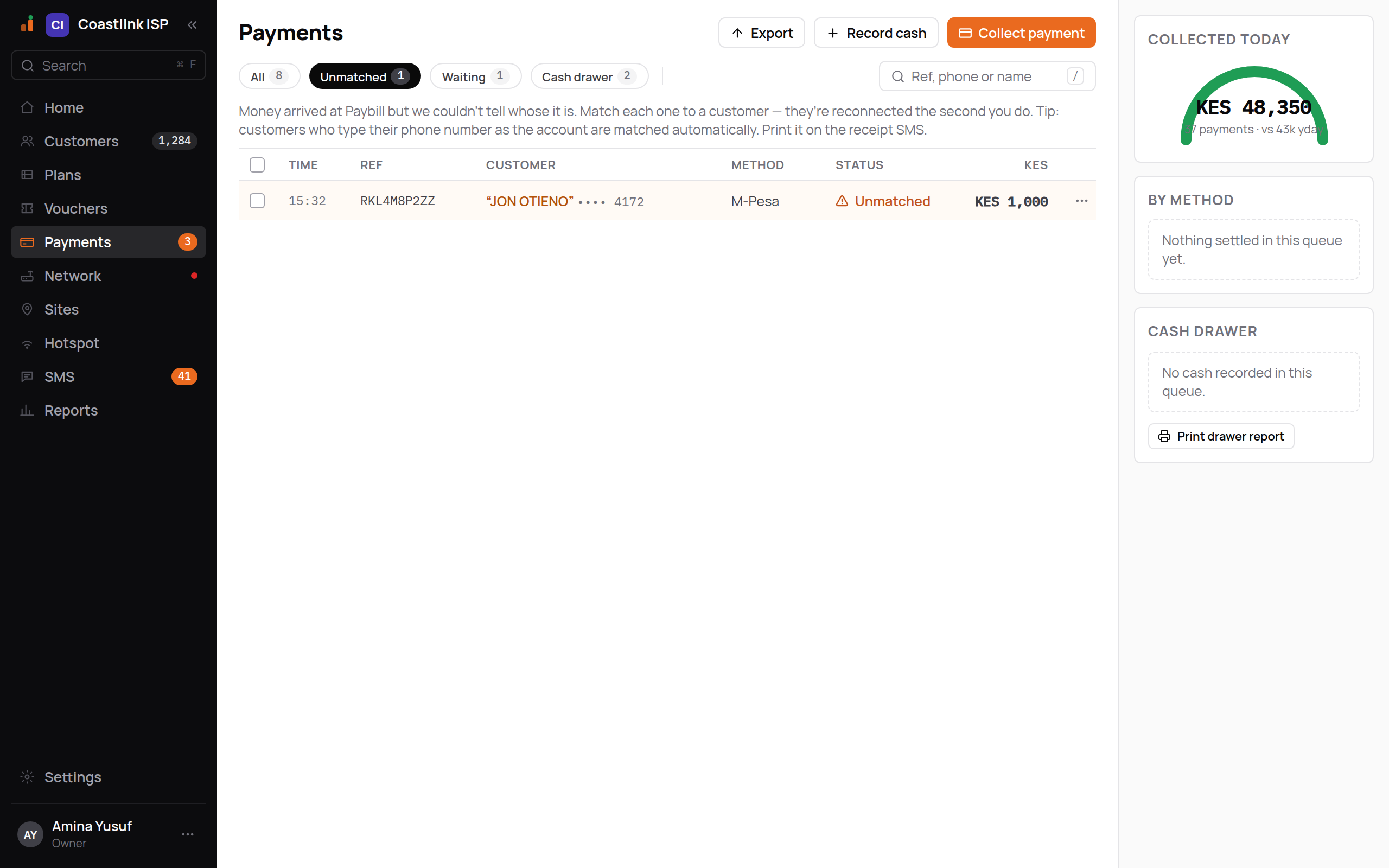
Header actions
- Export downloads the listed rows as CSV with Time, Receipt, Customer, Method, Status, Amount and Currency.
- Record cash opens "Record cash for…", a customer search ("Find customer by phone, name or username…"). Picking a customer opens Pay now on its Cash tab.
- Collect payment (orange, the one money action) opens the same search and lands on Pay now's first tab (your provider's phone prompt, when one is switched on).
Queues and filters
Four chips, each with a live count:
| Chip | Contains |
|---|---|
| All | Every payment loaded |
| Unmatched | Money that could not be tied to a customer. This chip stays orange even when another queue is selected |
| Waiting | Prompts sent and not yet settled (PENDING or INITIATING) |
| Cash drawer | Cash and bank payments recorded by a cashier |
Beside them are Method and Cashier facet chips and a search box ("Ref, phone or name"). Search and facets filter the rows already on screen. The list loads up to 200 rows per queue.
Empty states name the situation: "Nothing to match" (with "Money that can't be auto-matched will appear here."), "No cash payments yet", "No payments here", or "Nothing matches those filters. Clear the search or the Method / Cashier chips."
Columns and status words
| Column | Shows |
|---|---|
| Time | When it was paid (or created, if not yet paid) |
| Ref | The M-Pesa receipt, for example SLJ7X2K9QT, in monospace |
| Customer | Name and masked phone, •••• 8891 |
| Method | M-Pesa, or Cash with the cashier's name |
| Status | Dot and word, below |
| KES | Amount in whole shillings |
| Word | Meaning |
|---|---|
| Paid (green check) | Settled. Service extended, customer reconnected |
| Unmatched (orange) | Money received, customer unknown. Needs you |
| Waiting (amber, pulsing) | Prompt sent, not yet answered |
| Failed / Expired (red cross) | Prompt declined, cancelled or timed out. Nothing charged |
| Refunded (grey) | Reversed at the provider |
Unmatched rows are tinted and sit at the top. The ⋯ menu on any row offers Match (unmatched rows only) and Copy receipt.
The right rail shows Collected today, By method (provider payments green, cash neutral) and Cash drawer, all computed from the queue you are looking at.
Why money lands in Unmatched
The Unmatched queue carries this explanation: "Money arrived through a payment provider but we couldn't tell whose it is. Match each one to a customer, they're reconnected the second you do. Tip: customers who type their phone number as the account are matched automatically. Print it on the receipt SMS."
Each unmatched row carries a reason:
| Reason | What happened | What to check |
|---|---|---|
no-match | The reference the payer typed matched no account number, phone or username | Ask who the money is for. A typo in the account number is the usual cause |
ambiguous-phone | The reference is a phone that is on several customers | Ask which account it is for. The registered phone has already been texted to use the account number next time |
ambiguous-ref | A phone-shaped reference matches one customer's phone and another customer's username | Pick the customer the payer meant |
currency-mismatch | The payment is in a different currency from your ISP's. ImaraISP never converts it | Decide with the customer how to handle it |
short-paid | A prompt was paid for less than it asked for | Match it. It is credited like any payment |
charged-after-failed | A prompt was written off as failed, and the provider then confirmed the charge. ImaraISP never turns a failed payment into a paid one on its own | Match it to the customer who was charged |
A reference that matches nobody is never matched to the payer's own phone, because people often pay for someone else. The money waits here instead.
If a customer says they paid and there is no row at all, the provider's confirmation may never have reached ImaraISP. Use Check with provider (below).
For how account numbers and phone references are read, see How customers pay.
Matching a payment
Open the Unmatched queue
Click the Unmatched chip. Each row shows the amount, the masked payer phone, the account text they typed and the receipt.
Click the row
A panel opens in place titled "Unmatched · KES 2,500" with the receipt underneath. It shows From, Account and Paid, then Suggested matches. Each suggestion carries a reason: "same phone" in green when the payer's number matches a customer, or "name match" when only the name is close.
Select a suggestion to see the consequence
Click the customer's name (not the button) and a sentence appears, for example "Will extend John Otieno to 3 Oct and keep KES 1,000 as credit." or "Will credit John Otieno KES 1,000." Read it before committing.
Click Match
The first suggestion's Match button is black; the others are outlined. Matching is not optimistic: the row leaves the queue only after the server confirms. If that buys a plan period, the customer is extended and reconnected in the same step.
Matching credits the money to that customer and buys whole plan periods from their credit, exactly like any payment. Anything left over stays as credit.
If no suggestion fits, type in Search another customer at the bottom of the panel. Results appear in the same list and match the same way. When nothing looks right the panel says "No customer looks like a match, search for one below."
Match is a money decision
Once matched, a payment is Paid and cannot be undone from this screen. If the sentence says it will extend the wrong person, do not click Match.
Check with provider
The panel's Check with provider button asks the gateway directly what it knows about this payment. Use it when a customer insists they paid but the row is still waiting or unmatched. The answer is one sentence:
- "The gateway confirmed it, this payment is now PAID."
- "The gateway has not settled this yet. It is still waiting on the payer."
- "The gateway reports no change, still PENDING."
A check that finds money settles it through the normal path, so it is as complete as a callback would have been.
Legacy credit to review
When customer wallets started, each customer's old credit was carried into the wallet as an Opening balance only where a paid receipt backs it up. Credit that could not be verified that way was not carried over. It waits for a person on this screen instead.
The Legacy credit to review card sits above the table, whichever queue is selected. It appears only for people with the "Customers: adjust balance" permission (Owner and Ops by default), and only when something is waiting. A granted row leaves the card; with nothing left, the card is not shown.
Each row shows the Customer (click the name to open their record), Account, the Ref the old credit carried, the Date and the Amount. Check each one against your own records: a paper receipt book, a bank statement, or the cashier who recorded it.
Grant adds that amount to the customer's wallet. It is written as a Staff adjustment and recorded in the audit log with your name. Granting is safe to repeat: a second click on the same credit, by you or a colleague, does nothing more.
Granting only adds credit. Like any adjustment, it does not renew a connection by itself: the credit is spent by the customer's next payment, by the automatic renewal from credit at expiry, or by Allocate credit on the customer's Wallet tab.
There is no reject button. A credit you decide not to honour stays on the list and never reaches the wallet.
Refunds and reversals
A payment your provider reverses shows as Refunded. Reverse the transaction in your provider's own portal (for example the M-Pesa business portal); ImaraISP records the reversal when it arrives. The money comes back out of the customer's credit and the plan periods it bought are voided. If that leaves the balance below zero, the customer shows as Owed. Every step is visible on the customer's Wallet tab.
Recording cash
Cash and bank payments are taken from Pay now, not from this screen. Record cash here is a shortcut to that page. Recorded cash appears in the Cash drawer queue with the cashier's name in the Method column, and the rail totals it per cashier.