 ImaraISP
Notifications
Add the SMS gateway that carries login codes, receipts and expiry reminders, and test it
Settings → Notifications is "How customers and staff hear from you — login codes, expiry reminders, receipts. Add the SMS gateway that carries them." ImaraISP does not send SMS on its own; it hands each message to a gateway account you own. Only Owners can add or change gateways.
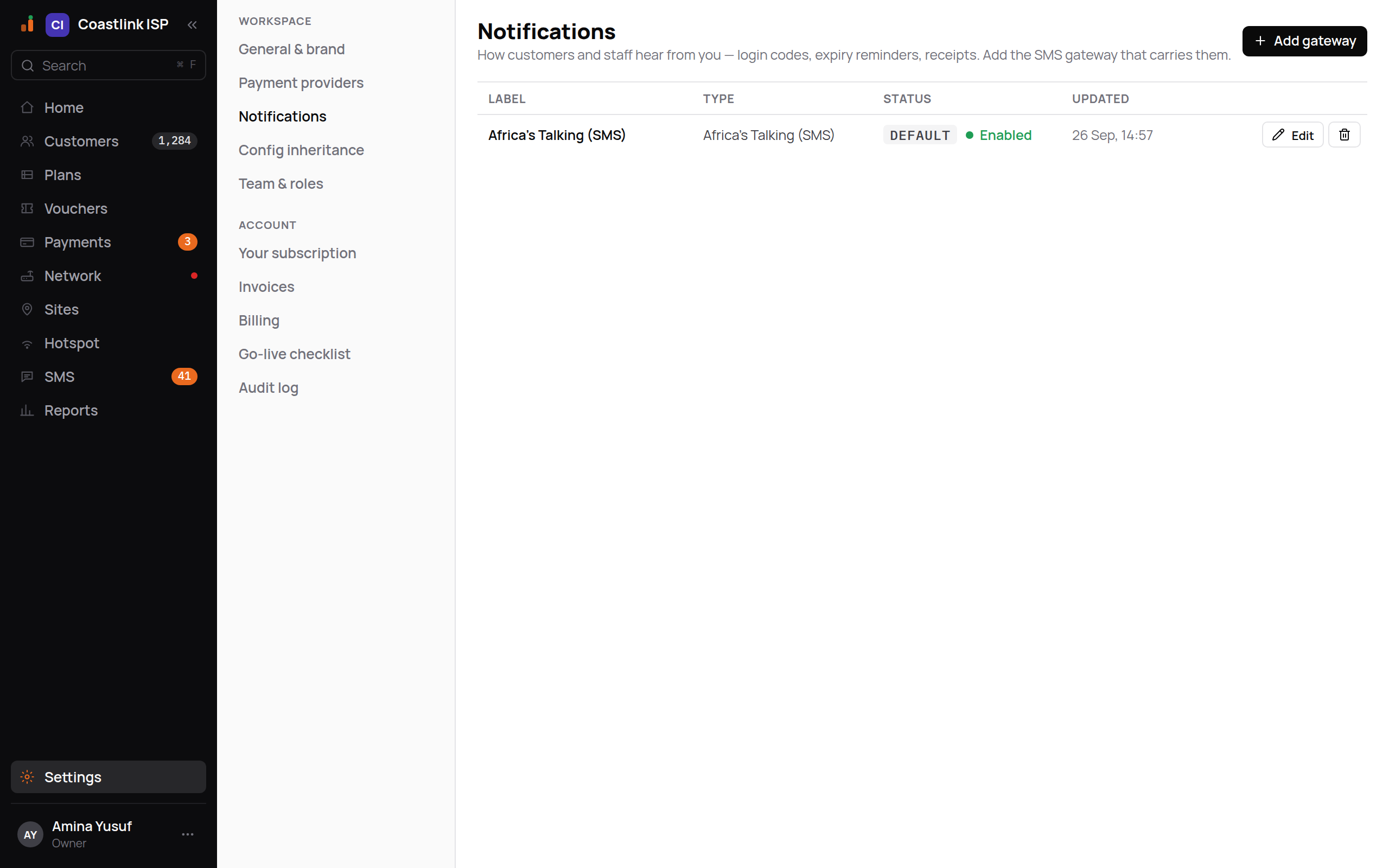
In the example above Coastlink ISP has one gateway, Africa's Talking (SMS), tagged DEFAULT and Enabled, with Edit and a bin icon on its row and the Add gateway button in the header.
Until you add a gateway
The empty state reads "No SMS gateway yet." Until one is saved, no SMS leaves the platform: subscribers using a phone code on the portal do not receive it, and expiry reminders are not delivered. Add a gateway before you go live with a hotspot.
The list
| Column | Meaning |
|---|---|
| Label | The gateway's name |
| Type | Which service it is |
| Status | Default tag on the gateway messages go through, then Enabled or Disabled |
| Updated | When it was last changed |
Each row has Edit and a bin icon that removes the gateway immediately.
Supported gateways
Pick the one you already have an account with. Fields marked secret are stored encrypted and never shown again.
| Gateway type | Fields |
|---|---|
| Africa's Talking (SMS) | Username, Api key (secret), Sender id (optional, up to 11 characters), Sandbox (tick while testing) |
| Advanta Africa (SMS) | Api key (secret), Partner id, Shortcode |
| Beem Africa (SMS) | Api key (secret), Secret key (secret), Sender id (optional) |
| Infobip (SMS) | Api key (secret), Base url (the one Infobip gave your account), Sender id (optional) |
| Onfon Media (SMS) | Api key (secret), Client id, Sender id (optional) |
| Twilio (SMS) | Account sid, Auth token (secret), From (your Twilio number) |
| Custom HTTP endpoint | Method (GET or POST), Url, Auth (none, hmac or bearer), Hmac secret or Bearer token (secret), Body template, Accepted status (default 200-299), Message id path, Cost per segment |
The Custom HTTP endpoint is for a gateway not on the list: the platform posts the rendered message to your URL. The body template uses the same {var} tokens as SMS templates. The URL (and Infobip's base URL) must be a public address: private and internal addresses are refused, and redirects are not followed.
Only gateways that deliver to your country
Gateway type offers only gateways that deliver to numbers in your workspace's country. For example: Advanta Africa and Onfon Media deliver in Kenya only. Beem Africa delivers in Tanzania, Kenya, Uganda and Rwanda. Africa's Talking delivers in its own markets: Kenya, Uganda, Tanzania, Rwanda, Malawi, Zambia, Nigeria, Ethiopia, Ghana, Côte d'Ivoire, Cameroon and South Africa. Twilio, Infobip and the Custom HTTP endpoint are offered in every country.
Adding or re-enabling a gateway that does not deliver to your country is refused with "Onfon Media (SMS) does not deliver to UG" (your gateway and country code in place of these). A gateway you already have keeps working, and you can still edit or remove it.
Add a gateway
Click Add gateway
The panel "Add an SMS gateway" opens. Choose the Gateway type.
Fill in the fields
Use the credentials from the gateway's own dashboard. A sender ID must be one the gateway has approved for you, or messages are rejected.
Click Save
The note beside the button reads "The API key is stored encrypted and never shown again." When you edit later the key shows masked; leaving it masked keeps the stored value. If saving fails: "Couldn't save this gateway. Check the fields above and try again."
Click Test connection
The button is disabled until the gateway is saved ("Save the gateway first — testing reads the stored config."). Success reads "Connected — credentials accepted." A failure quotes the gateway, for example "africas-talking rejected these credentials (HTTP 401)".
The first gateway you add becomes the default. To switch gateways, add the new one, test it, then remove the old one.
What gets sent
The platform sends these messages through the default gateway:
| Message | When | Example text |
|---|---|---|
| Login code | A subscriber signs in to the portal or their account with phone OTP | "123456 is your ImaraISP login code. It expires in 5 minutes." |
| Expiry warning | 3 days before a service expires | "Your Home 10Mbps plan expires on 27 Sep. Top up to stay online." |
| Expired | When the service expires | "Your Home 10Mbps plan has expired. Top up to get back online." |
| Payment receipt | After a payment settles | "Payment received. Thank you." |
| Team invite | When you invite staff by phone | "You have been invited to Coastlink ISP on ImaraISP as Cashier." |
Usage alerts and unmatched-payment notices are for operators and are not sent by SMS.
The wording of subscriber messages can be changed on the SMS screen, which also shows every message sent, its delivery status and failures (the SMS count in the sidebar is the number of failed messages). See SMS.
Sandbox accounts
Africa's Talking offers a sandbox. Tick Sandbox while testing; messages go to the simulator, not to real phones. Untick it and enter your live key before going live.