 ImaraISP
SMS
See every message sent, send one by hand, and control templates, routing and providers
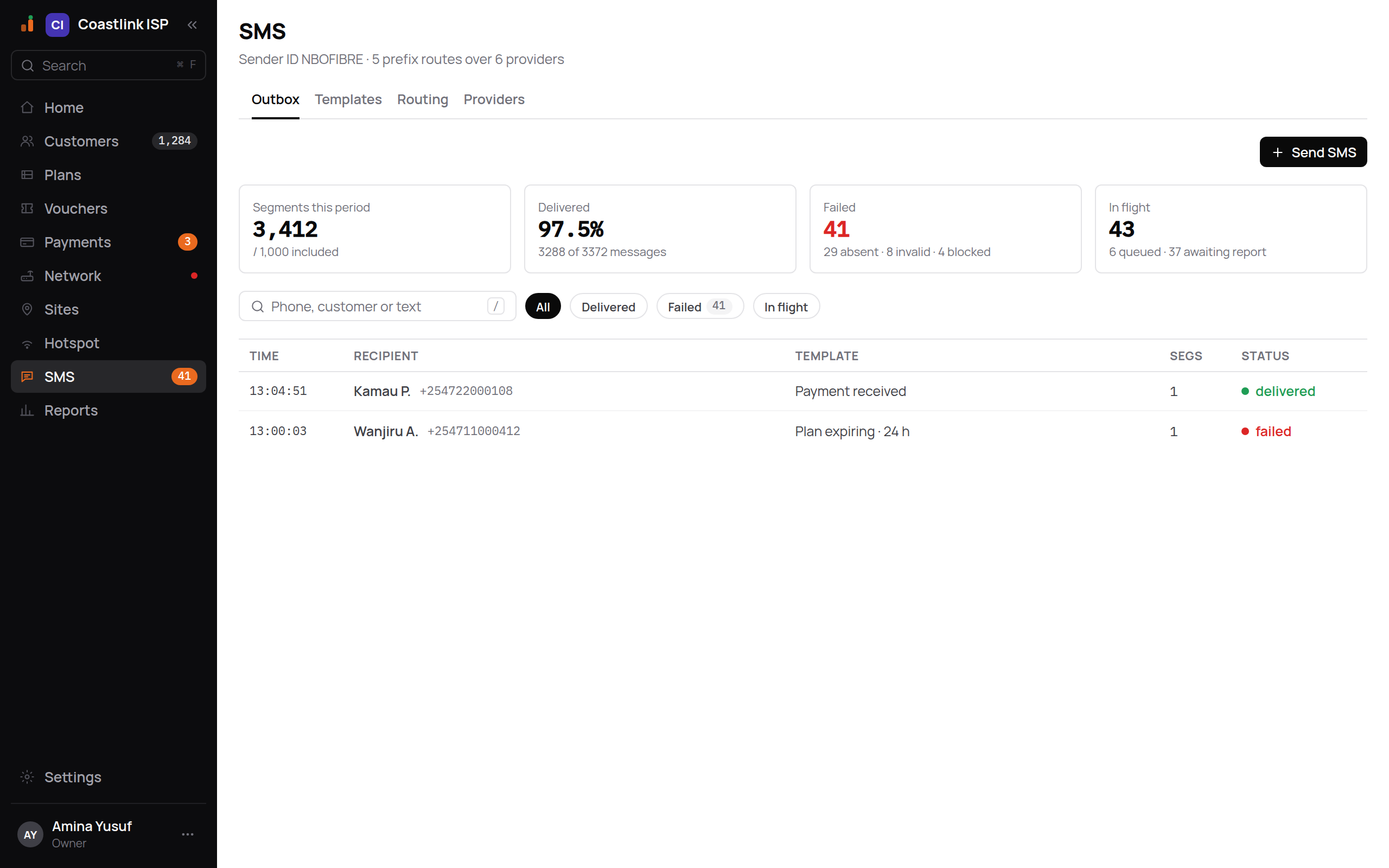
The SMS screen has four tabs: Outbox, Templates, Routing and Providers. Under the title a summary line reads, for example, "Sender ID NBOFIBRE · 1 prefix route over 2 providers", or "No sender ID set" until one is configured.
ImaraISP sends SMS for you automatically: payment receipts, expiry reminders, one-time codes. This screen is where you see them go out and decide how they are delivered.
Outbox
The Outbox is the log. Four tiles at the top: Segments this period, Delivered, Failed and In flight. A segment is one 160-character part of a message; long messages cost several.
Filter chips: All, Delivered, Failed, In flight. The search box takes "Phone, customer or text".
| Column | Shows |
|---|---|
| Time | When it was sent |
| Recipient | Customer name and number |
| Template | Which template produced it, for example "Payment received" |
| Segs | Segments billed |
| Status | DELIVERED, FAILED or in flight |
Empty state: "No messages. Messages sent through this route/template combination will show up here."
Click a row and the right rail shows the recipient, Details (Template, Length in characters and encoding, Routed via which route and provider, Provider ID, Billed segments) and a Timeline of each delivery step. For a failed message, Retry now sends it again through the routing chain. Open customer jumps to their record.
The Rules card reminds you: "Numbers that replied STOP are suppressed for marketing templates only." Receipts and codes still go out.
Sending one by hand
Send SMS opens a dialog with To (the box shows an example number from your country, such as +254 712 345 678), a choice of a saved template or free text ("Type a message…"). Free text is sent as a support message, never as marketing, so it is not affected by STOP suppression. A failure shows "Could not send."
Templates
Templates are the wording of every automatic message. ImaraISP provides the standard set; you adjust them for your ISP rather than create them from scratch.
Select a template to edit:
- Locale: English or Kiswahili. Each template carries both.
- Message: the body with placeholders in braces, for example
Hi {customerName}, your {planName} plan expires {expires_at}. Renew for {price}. - Enabled switch. Some system templates are locked on.
- Delivery: Quiet hours start and end, so reminders do not go out at 3 am. Reminder and marketing templates respect quiet hours; receipts and codes do not.
- Kind: reminder, marketing, support or system. Kind decides STOP handling and quiet hours.
- Preview: the message rendered with a sample subscriber. Enter a Test number and click Send test; "Test queued." confirms it.
- Resolves from: which level of your tenant tree supplies the wording. Each level shows "default", "not set" or "set here · wins". A branch inherits its parent's wording until it sets its own.
Money placeholders ({amount}, {price}, {amount_due}) are filled in with the currency already included, in your workspace's currency (for example KES 1,500 or UGX 5,000), so don't type a currency in front of them. The preview and Send test use the same sample values, in your currency.
{currency} is your workspace's currency code on its own (for example KES or UGX), for wording like Prices are in {currency}. It is available in the payment received, credit held, shared-phone and plan reminder templates.
{phone} (in the shared-phone template) is the customer's number written the way people in your country write it, with the leading 0 and spaces (for example 0722 123 456 in Kenya or 0772 123 456 in Uganda), not the + international form. The preview shows a sample number from your country.
Quiet hours in your timezone
Quiet hours are read on your business's own clock: the timezone set for your business, not any fixed city's and not the server's. A reminder written at 22:30 in Kampala waits until 07:00 Kampala time; the same moment in Lagos is 20:30, outside the window, so it goes straight out. A message held for quiet hours is delayed, never dropped.
A template's own quiet hours win. A template with none uses your business-wide setting SMS quiet hours (under Settings, inherited from your reseller unless you set your own), written as 21:00-07:00. Clear it to switch business-wide quiet hours off.
The plan expiring and plan expired reminders go out once a day at 09:00 your time, whichever timezone your business is in.
The plan expiring and plan expired reminder templates can also use {amount_due} (what the customer owes for the next period, after credit), {account_no} (their account number), {paybill} (your paybill or till number) and {pay_url} (their pay link). {pay_url} is filled in only when you have a published portal. For example: Hi {customerName}, your {planName} plan expires in {daysLeft} day(s). Pay {amount_due} with account number {account_no} to stay online. {pay_url}. The expiring reminder is skipped when the customer's credit already covers the renewal. See How customers pay.
Routing
Routing decides which provider carries a message, by phone prefix. Each route is a card: a prefix (+254, or any for everything else) and a failover chain of providers.
- Type a number into the test box ("Test number, e.g. +254 711 402 118") to see which route would carry it.
- Select a route to edit it in the rail: Mode is Chain · in series (try providers in order until one accepts) or Static (always the first). Steps lists the providers; pick one from "Add a provider…" and click Add step, or remove a step with its ✕. Cost shows the per-segment estimate; "Own-provider cost is for routing estimates only."
- Any edit puts the route back into DRAFT. Click Publish routes to make every draft route live at once. Messages keep using the last published routes until then.
Empty state: "No prefix routes yet. Add a route (e.g. +254) and give it a failover chain."
Providers
Two groups:
- ImaraISP providers: gateways ImaraISP runs for you, billed on your ImaraISP invoice per segment. The table shows Provider, Covers (which countries), Per seg (price per segment, in that provider's own currency) and Status. "Price not set" means ImaraISP has not priced that provider yet; messages through it still go out, and are not charged until a price is set. Nothing to set up; add one as a routing step and you are sending.
- Your providers: gateways you connect with your own account. Empty state: "No gateways connected yet. Add your own SMS gateway or route through an ImaraISP provider." Click Add provider, pick the gateway type and fill in its fields (send endpoint, credentials, body template, cost per segment). "Secrets encrypted, never shown again." After saving, the gateway's delivery-report URL appears ("Save to get this gateway's delivery-report URL"); paste it into the gateway's dashboard so delivery statuses flow back.
The Failover card describes the chain behaviour: move to the next provider on "Submit error or no answer in 10 s", skip a provider while it is failing, and count delivery failures. "Edit which providers a route tries in the Routing tab."
Credits and cost
There is no prepaid SMS balance in ImaraISP. Messages sent through ImaraISP providers are counted as segments and appear on your subscription's SMS sent meter and invoice (see Your subscription). Messages through your own gateway are billed by that gateway; the cost you enter is used only for routing estimates.
Phone login codes need SMS
The portal's phone login (OTP) sends its code by SMS. Until a route and provider exist, subscribers cannot complete that login.