 ImaraISP
Workspace settings
A map of the Settings area, the Config inheritance screen where every workspace setting is resolved, and the Features card
Settings is where an Owner shapes the workspace. The left column groups its pages into two blocks. You see only the pages your role allows.
| Block | Page | What it is for |
|---|---|---|
| Workspace | Payment providers | How your customers pay you: the gateways you connect (for example M-Pesa or Paystack), cash and bank. See Payment providers |
| Workspace | Notifications | The SMS gateway that carries login codes, receipts and reminders. See Notifications |
| Workspace | Config inheritance | Every workspace setting, where its value comes from, and your overrides. Described below |
| Workspace | Team & roles | Who can act in your workspace and what each role allows. See Team & roles |
| Account | Your subscription | Your ImaraISP plan, the meters for each unit and how much of each you have used. See Your subscription |
| Account | Billing | Your ImaraISP billing details and how you pay for the platform |
| Account | Go-live checklist | The five things a new workspace needs before it is live. See Go-live checklist |
Config inheritance
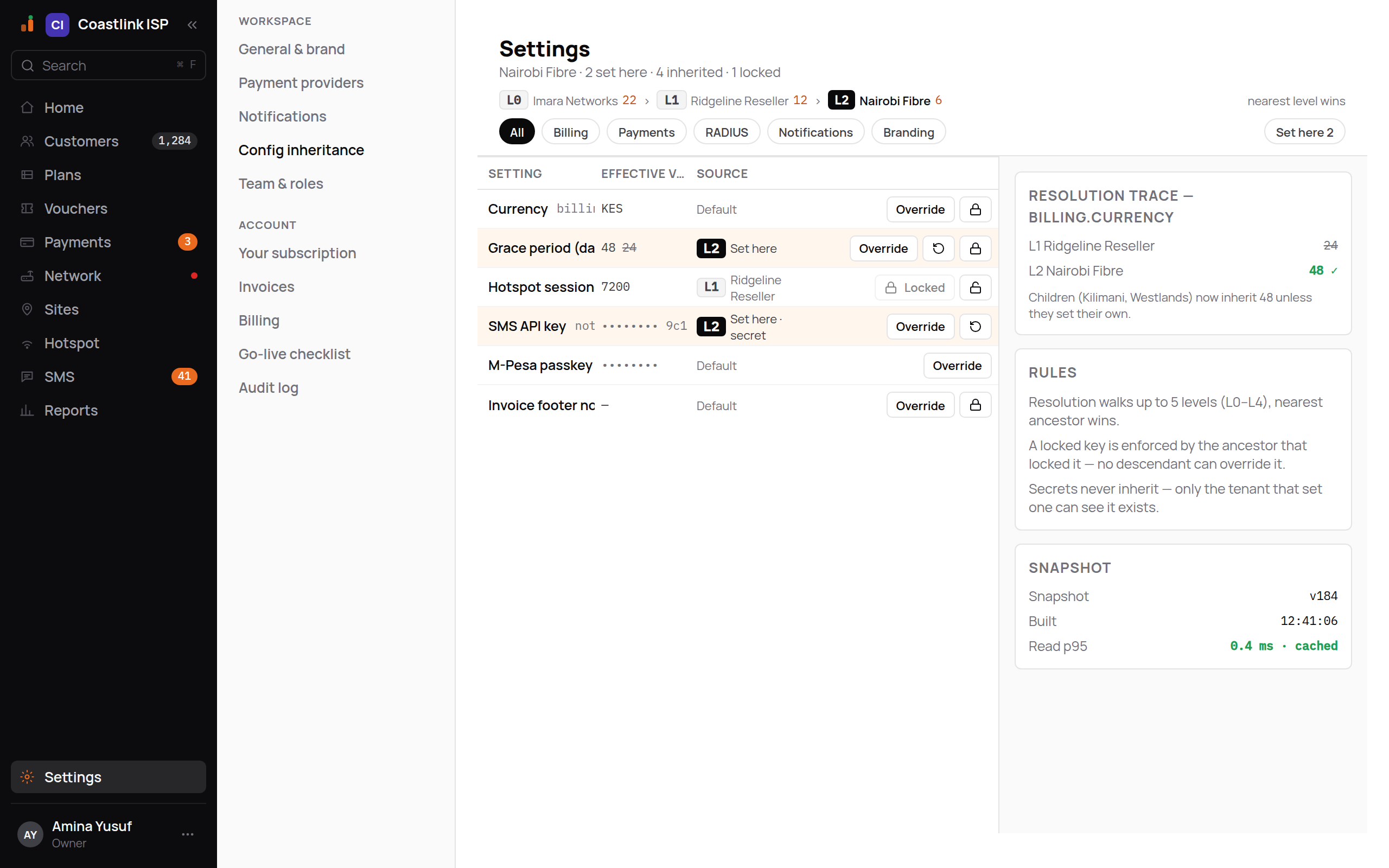
Settings → Config inheritance lists every workspace setting: VAT rate, grace period, hotspot session timeout, SMS keys, provider secrets and more. Each setting resolves down the chain of workspaces above you. A value your reseller sets applies to every ISP under it; a value you set here wins over it, unless the reseller locked it. Nobody has to set everything: a setting nobody touched uses its default.
The header reads, for example, "Nairobi Fibre · 2 set here · 4 inherited · 1 locked". Above the table the chain of workspaces is drawn with a level tag on each, from the reseller down to you, with the reminder "nearest level wins".
Reading the table
Filter with the tabs All · Billing · Payments · RADIUS · Notifications · Branding, and the Set here chip to show only the values you set yourself.
| Column | Meaning |
|---|---|
| Setting | The label, for example "Grace period (days)" or "Hotspot session timeout" |
| Effective value | What applies to you now. A struck-through value beside it is what the level above had set before you overrode it |
| Source | Set here (with your level tag), Default (nobody set it), or the name of the workspace above you whose value you inherit |
Rows you set yourself are tinted. Secrets show masked ("•••••••• 9c1") and read "Set here · secret".
Settings your reseller sets for you
If your workspace was created under a reseller, some rows already carry a value with the reseller's name as the Source. You inherit those without doing anything. Your reseller can also mark settings as required; those count on the Go-live checklist until you set a value of your own.
Overriding a value
Click Override on the row
An inline editor appears. Percentages are typed as a percentage; structured settings are edited as text.
Type the value and click Save
For a secret the empty field reads "New value — shown once after saving". Once saved it is masked and cannot be read back.
Reset when you no longer need it
The arrow icon beside a value you set ("Reset to inherited") removes your override and the inherited or default value applies again.
Cancel abandons the edit. Overriding is an Owner action; Ops can read the screen but not change it.
Locked settings
A row that reads Locked with a disabled button was locked by a workspace above you. You cannot override it, and the source names who locked it. The padlock icon on a row you own lets you lock that value for every workspace under you; if you run branches or child ISPs, that is how you enforce a value down the tree. Click it again to unlock.
The right rail
- Resolution trace: click any row to see every level that set the setting, with the winner ticked green and the others struck through. "No overrides anywhere in the chain — resolves to the catalogue default." means nobody set it. If you have workspaces under you, a note says which of them now inherit your value ("Children (Kilimani, Westlands) now inherit 48 unless they set their own.").
- Rules: the nearest level wins. "A locked key is enforced by the ancestor that locked it — no descendant can override it." "Secrets never inherit — only the tenant that set one can see it exists."
- Snapshot: the version of the resolved settings you are looking at and when it was built.
Settings you will meet first
| Setting | What it does |
|---|---|
| VAT rate | The VAT added to invoices you receive for the platform. Nobody set it: your country's standard rate (16% in Kenya, 18% in Uganda, 0% where none is on file) |
| Grace period (days) | Days after a service expires before it is suspended. Plans carry their own grace too; see Plans |
| Hotspot session timeout | Seconds a hotspot login may stay up before it must log in again |
| SMS API key | A secret; never inherited, write-only |
| Provider secrets | For example the M-Pesa passkey: a secret, the same value the Payment providers screen stores |
Your workspace's currency and timezone are not settings here: they come from your country, set when the workspace was created, and every screen, invoice and SMS uses them.
Grace period and RADIUS values change what subscribers get
The grace period is the number of days after expiry before a service is suspended. RADIUS settings such as the hotspot session timeout are sent to every hotspot login. Change them deliberately; every override is logged.
Features
Owners see a Features card in Settings with one switch:
- Fibre (OLT/ONT roles, FTTH profiles): "Unlocks OLT/ONT device roles, the ftth-ont-hgu profile, and equipment-swap for customers moving to fibre."
Leave it off unless you run fibre. Click Enable to turn it on; the app reloads so every screen picks up the OLT and ONT device roles and the fibre profiles. Disable turns it off again. If the request fails you see "Could not update — try again."