 ImaraISP
Vouchers
Mint batches of prepaid hotspot codes, print them, and see which ones were redeemed
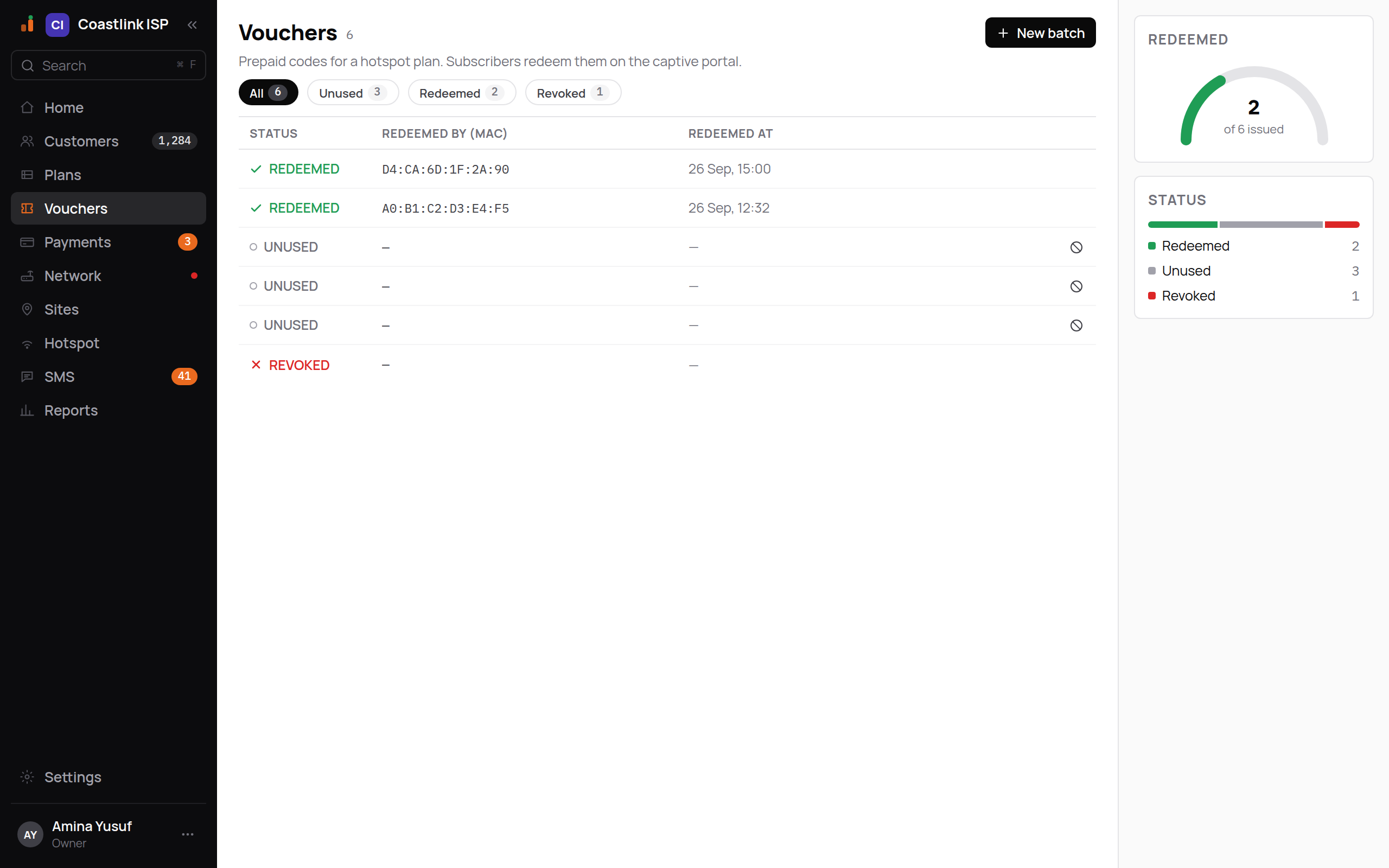
Vouchers are prepaid codes for a hotspot plan. You generate a batch, print or hand out the codes, and a subscriber types one into the captive portal to get online without paying through a payment provider. The screen's own description: "Prepaid codes for a hotspot plan. Subscribers redeem them on the captive portal."
Voucher codes only work if Voucher codes is switched on in the Hotspot portal editor and the portal is published.
Creating a batch
Click New batch
The black New batch button opens New voucher batch. It needs the write permission; Viewers and Support do not see it.
Fill in the batch
- Plan: "Choose a hotspot plan". Only active hotspot plans are listed. The code grants exactly this plan.
- How many: the number of codes to mint (default 10).
- Face value (KES, for reporting): what you sell each code for. It is recorded for your reports; it does not change the plan.
- Note: free text, for example "Kiosk A, Sept batch".
Click Generate codes
If a field is wrong you see "Couldn't create the batch, check the fields."
Print or copy the codes now
The dialog changes to a list of codes in monospace, for example CBD-1D-4KX2, with the notice "3 codes generated. Copy or print them now, they are shown only once." Click Print to send the list to your printer, then Done.
Codes are shown once
After you click Done the plaintext codes cannot be viewed again. The list shows only status and redemption details. If a sheet is lost, revoke the unused codes and mint a new batch.
The list
The header shows the total number of vouchers. Filter chips with counts: all, unused, redeemed, revoked.
| Column | Shows |
|---|---|
| Status | UNUSED, REDEEMED or REVOKED |
| Redeemed by (MAC) | The device that used the code, in monospace |
| Redeemed at | When, in your business's timezone |
| Status | Colour | Meaning |
|---|---|---|
| REDEEMED | Green check | The code was spent. This is money collected |
| UNUSED | Grey dot | Inventory, waiting to be sold |
| REVOKED | Red cross | Cancelled by an operator. It no longer works |
The right rail shows Redeemed as a gauge ("of N issued") and a Status bar split into Redeemed, Unused and Revoked.
Empty states: "No vouchers yet. Create a batch to hand out prepaid codes." and, when a filter hides everything, "No vouchers match. Clear the filter chip to see the rest of the batch."
Revoking a code
Each UNUSED row has a revoke button (the ⊘ icon, "Revoke this voucher"). Revoking is immediate and permanent; use it for lost or stolen sheets. Redeemed codes cannot be revoked because the session was already granted.
Printing and exporting
Printing happens once, from the batch dialog, using your browser's print dialog. For accounting, the face value you entered per batch and the redemption counts are what the list and reports carry.
How a subscriber redeems a code
- They join your hotspot Wi-Fi and land on the portal.
- They tap "Have a voucher?" and reach Redeem a voucher.
- They type the code into the three-part code box (it advances automatically between parts) and their phone number.
- The portal checks the code, marks it REDEEMED against the device's MAC, and logs the device into the hotspot the same way a paid login does.
A code that is unused, revoked or for a plan no longer on the portal is refused with a message on the phone. The subscriber's device and time then appear in the list.